

Floorplanbase — AI Studio

Real estate photos, listing-ready in minutes.

Drop in finished photos — or RAW exposure brackets straight off the camera — and get back polished, magazine-quality images in minutes: HDR-edited, virtually staged, relit or retouched. Seven AI services, one token wallet, and a branded gallery to hand the finals to your client.

Pay as you go. No subscription — buy tokens once, spend them per photo.

Before · RAW fileStraight off the camera
Finished · AI HDRBlended, corrected, polished
Before After
Finished in minutes Drag to compare
Raw bracket on the left, finished HDR on the right — drag to compare. NEF · ARW · CR2 · CR3 · RAF · ORF · DNG
100,000+
images processed
from 29¢
per AI HDR edit
No subscription
only pay per photo
01 AI HDR Editing The flagship

Shoot brackets. Drop the RAWs. Walk away.

Upload exposure brackets of 2–5 frames — or singles — exactly as they come off the camera. What comes back is a finished, delivery-ready photo at one flat price per image, no matter how difficult the light was.

01 Brackets blended into one natural photo 2–5 exposures combined — bright windows and detailed interiors in the same frame, with none of that over-processed HDR look.
02 Lenses and walls corrected Distortion removed and walls straightened automatically — truer than the camera's own level.
03 Colour, light and windows balanced A final polish on every frame, so whole shoots come back consistent.
04 Always delivered in 4K Every RAW edit comes back at full resolution — always, at no extra charge.
05 All major RAW formats NEF, ARW, CR2, CR3, RAF, ORF and DNG — plus ordinary JPGs.
Kitchen · finished HDR
Living · finished HDR
Exterior · finished HDR
Interiors and exteriors, every frame finished to the same standard. Finished HDR
02 Virtual Staging Coastal

The same room, in any style.

Pick a style and drag the divider — an empty room returned fully furnished, with the room's scale, light and architecture respected.

Before · Empty roomYour original photo
StagedAI-generated, photoreal
Before After
Rendered in minutes Drag to compare
Pick a style above to restage the room. Most-requested styles

One-click staging

In a hurry? Pick a room type and a style, and AI furnishes the photo for you — no placement, no setup. The fastest route from empty room to a listing-ready image.

Or place it yourself in 3D

Want control over the exact layout? Arrange real furniture in our online 3D editor, then let AI render it photorealistically — true perspective, walls and depth respected.

See the 3D editor
03 The editor Included with every photo

Your whole post-production desk, in the browser.

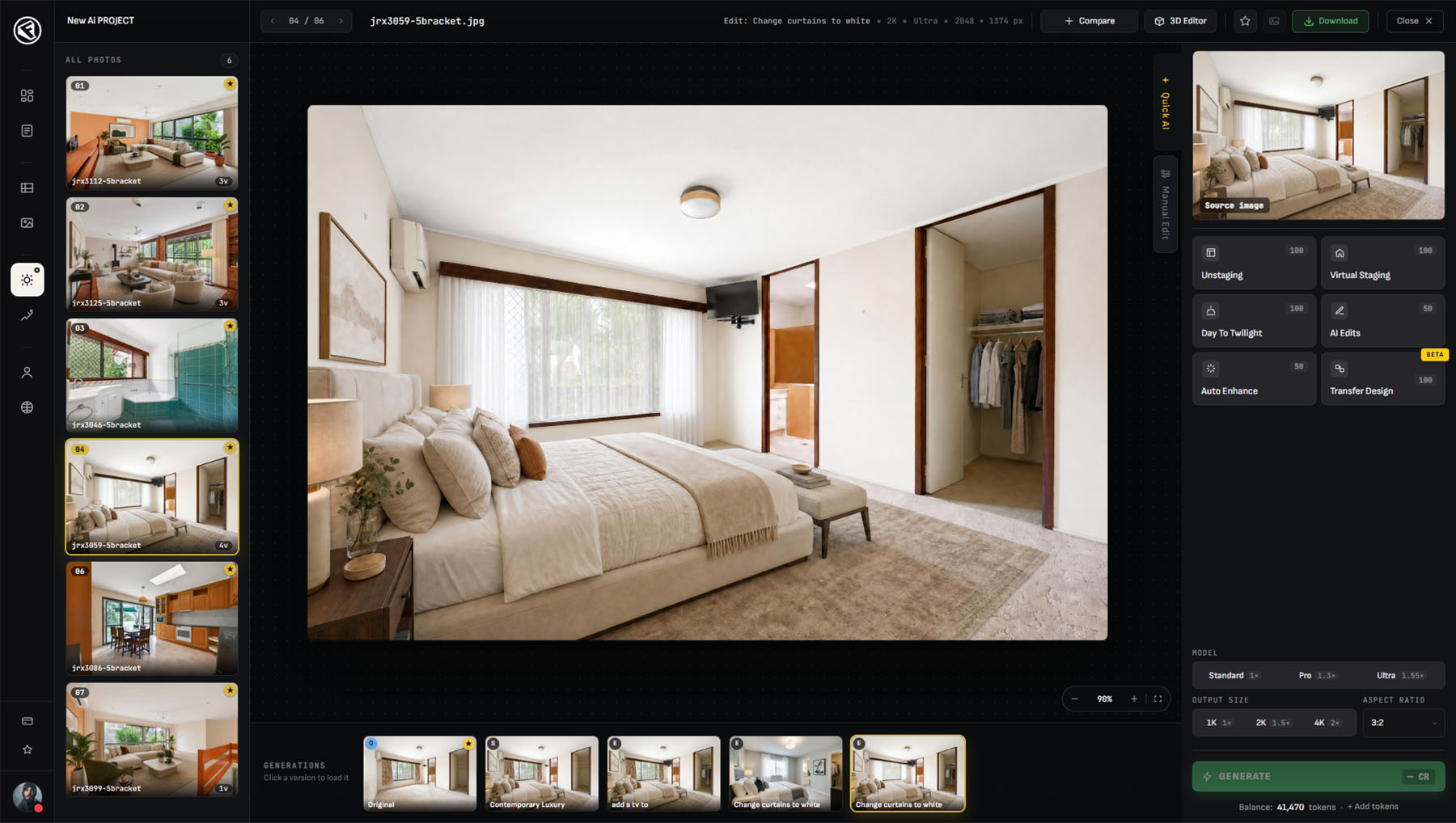
Every photo opens in a full workspace: one-click AI services on the right, a manual edit panel beside them, before/after compare across any two versions — and the token cost on the Generate button before you commit.

The Floorplanbase editor: a twilight pool photo open in the workspace, with Quick AI services, model and output-size options, and a live token balance
The Floorplanbase editor — your photos, AI services and manual tools in one workspace. Workspace
QUICK AI

Every service, one click

Unstaging, virtual staging, day to twilight, AI edits, auto enhance and design transfer — applied to the open photo from the side panel.

VERSIONS

Nothing gets lost

Every generation is kept beneath the photo. Compare any two side by side, reload an earlier one, and pin your finals.

YOUR CALL

Quality & size, per generation

Pick the quality and output size for each generation. RAW HDR edits always come back in 4K.

04 More AI services One token wallet

Everything between the shoot and the listing.

Day to twilight
Day to Twilight

Golden hour, on demand.

A daytime exterior turned into a warm twilight shot — glowing windows, dusk sky, soft sky gradient. The listing's hero image, without driving back to the property at sunset.

Best for the lead exterior shot
Multi-room staging

One design, every angle.Beta

Stage one photo of a room, then transfer that exact design to every other angle of it — the same sofa, the same rug, in every shot. The hard problem in virtual staging, finally solved.

The same furniture across multiple angles of one room

Unstaging & declutter
Unstaging & Decluttering

Empty the room, keep the light.

Furniture and clutter removed from occupied rooms — for clean, neutral listing photos, or as a blank canvas before you virtually stage the space in a new style.

Also preps a room for virtual staging

Before After
Edited in minutes Drag to compare
AI Image Editing

Describe the change, get the edit.

Retouching, just by asking: remove objects, fix the lawn, clear the driveway, replace the sky, tidy the small distractions. Type the change, get the edit back.

“make pool more inviting and remove the power lines”

Before After
Enhanced in seconds Drag to compare
Auto Enhance · JPG

Merged it yourself? We'll finish it.

Already merged your exposure brackets into a single JPG on your own computer? Run it through Auto Enhance for the same finishing our AI HDR gives RAW files — exposure, colour, windows and clarity balanced — on any single photo.

For JPGs you've already merged yourself

Also included

Every image opens in a free manual editor: exposure, contrast, highlights and shadows, white balance, vibrance, perspective and lens correction — with a live preview, your original left untouched, and zero tokens.

05 How it works
STEP 01

Upload

Drag in your photos or RAW brackets — a single image or an entire shoot at once. JPG, PNG and every major RAW format.

STEP 02

AI edits

Pick a service per photo. The token cost is shown before you generate; minutes later the finished image is ready.

STEP 03

Deliver

Share a private gallery with your own branding — download single photos or the whole set, no client login.

06 The 3D staging editor Place it yourself

Place the furniture yourself. Let AI render it.

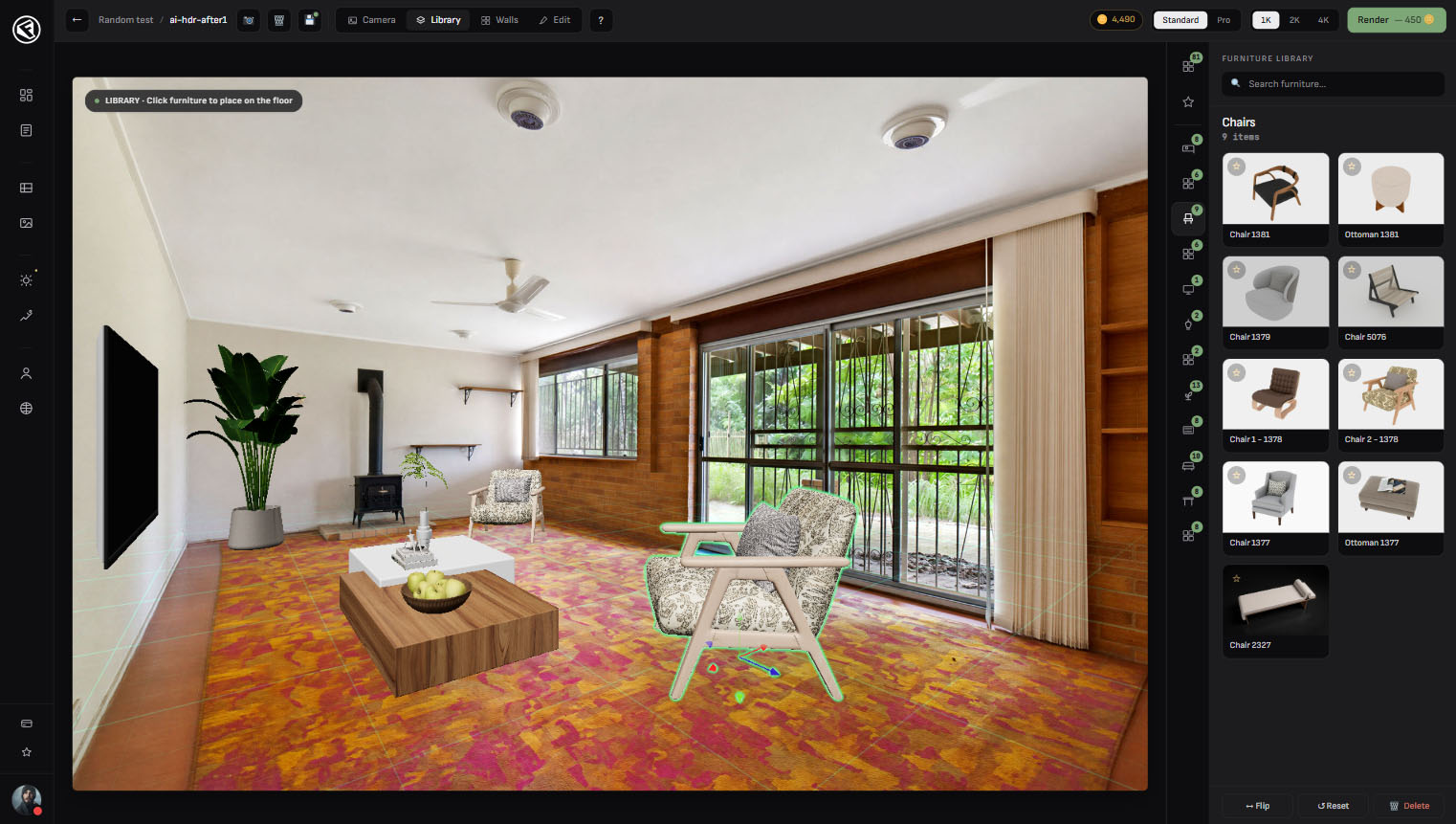
Rather direct the result than leave it to the AI? Open a room photo in our online 3D editor, place real furniture from the library exactly where you want it — true to the room’s perspective and scale — then let AI render the scene photorealistically. You set the layout; the AI just makes it real.

The Floorplanbase 3D staging editor: a furnished living room rendered in true perspective — armchairs, a coffee table and a plant placed over the photo — with the furniture library open on the right and a Render button showing its token cost
The 3D staging editor — arrange real furniture from the library, then render the scene with AI. 3D editor
MATCH

Locked to your photo

The editor matches your photo’s perspective and scale, so every piece sits in true 3D — never pasted flat on top.

FURNISH

Place it your way

Pull real furniture from the library — sofas, beds, lighting, plants — and drop it where you want.

RENDER

Photoreal, on your terms

When the layout’s right, AI renders your scene into a photorealistic, listing-ready image — in minutes.

Pricing

Pay for photos. Nothing else.

No subscription and no monthly minimum. Buy a token pack once and spend it per image — the cost of every edit is shown before you run it, and if a generation ever fails, the tokens come straight back. Secure checkout.

No subscription Cost shown before every edit No charge for failed generations
07 Questions
What can I upload?+

Ordinary photos (JPG, PNG) and RAW files from all major cameras — NEF, ARW, CR2, CR3, RAF, ORF and DNG. For HDR editing, send exposure brackets of 2–5 frames or singles; big batches upload reliably even on slow connections.

How does pricing work?+

You buy a pack of tokens once and spend them per image — no subscription, no monthly fee. Every service shows its cost before you run it, and your balance is always visible.

What if a result isn't right?+

Because results are AI-generated, they can vary — if the first isn’t quite right, just run another generation, or change the style, room type or photo until it is. For an image that’s almost there, AI Image Editing fine-tunes it from a simple instruction, while the free built-in editor handles manual tweaks like exposure, colour and contrast.

What happens if a generation fails?+

Now and then an AI generation doesn’t come through — usually on a more complex or unusual scene. If that happens, just run it again; the next attempt almost always works.

How do my clients get their photos?+

You can download all your generations, sort and group them however you need, and share them with anyone through a single link — no login needed.

Does it work on mobile?+

It’s built for desktop — uploading, editing and the 3D staging editor all live there. The galleries you share with clients open beautifully on any device.

Floorplanbase — AI Studio

Your next shoot, delivered the same day.

Upload a shoot and see it go to work on your own listings — buy tokens only for the photos you keep.

No subscriptionPay as you go